






The Technical Stuff Explained
FrequencyCast is a downloadable radio show covering digital TV, radio and wireless technology. Below is a list of some of the topics we've covered, and some technical definitions.
| Broadband / ADSL | High-speed, always-on Internet access. Many broadband providers are offering speeds of 8 megabits per second (up to 160 times faster than the old 56k dialup service). Podcast features: Broadband in depth on cast #17 | Get more from Broadband on 'cast #02 More info: See our Broadband Page |
| DAB | 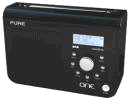 Digital Audio Broadcasting. A new radio service that offers more radio stations for special DAB radios - more radio choice, in digital quality, with less interference. A number of DAB-only stations are available, including BBC 1 Xtra, BBC 6 and BBC Radio 7. Stations such as Talk Sport, Virgin, Core, Life and the World Service are available, as well as a range of local and regional stations Digital Audio Broadcasting. A new radio service that offers more radio stations for special DAB radios - more radio choice, in digital quality, with less interference. A number of DAB-only stations are available, including BBC 1 Xtra, BBC 6 and BBC Radio 7. Stations such as Talk Sport, Virgin, Core, Life and the World Service are available, as well as a range of local and regional stations Podcast features: What is DAB? 'Cast #03 Podcast features: Pure One Reviewed? 'Cast #03 Other links: DAB Digital radio |
| Digital TV | Since the start of TV many years ago, we've been receiving TV with a TV aerial, pulling in 'analogue' signals sent over-the-air to our TVs. From October 2012, we've switched to digital TV. Digital offers more TV choice, less interference, and improved features. In the UK, digital TV means Sky Digital, Freeview, Cable and TV-over-Internet. Other links: Our page of Digital TV Options | Digital Switchover | Freeview | Sky Digital | Analogue Switchoff |
| EPG | 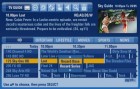 Electronic
Programme Guide - Associated with a digital TV set-top box, this refers
to built-in software on the set-top box or interactive TV that shows
you on-screen listings for TV shows. Some boxes have EPGs limited
to "now and next", whilst others support seven days worth
of programme listings. EPGs with advance programme listings are particularly useful for setting up recordings - some boxes are equipped with built-in
hard disks (PVRs, such as Sky+), and the EPG allows select a programme from the schedule and get the box to record the
programme onto disk just by selecting it from the programme listing. Electronic
Programme Guide - Associated with a digital TV set-top box, this refers
to built-in software on the set-top box or interactive TV that shows
you on-screen listings for TV shows. Some boxes have EPGs limited
to "now and next", whilst others support seven days worth
of programme listings. EPGs with advance programme listings are particularly useful for setting up recordings - some boxes are equipped with built-in
hard disks (PVRs, such as Sky+), and the EPG allows select a programme from the schedule and get the box to record the
programme onto disk just by selecting it from the programme listing. |
| HDTV |  High Definition TV - This offers higher-quality, crisper
TV pictures with loads more pixels than standard TV. Launched in May 2006, you'll need a TV with the "HD Ready" logo, plus a set-top box that delivers HD pictures, At the time of writing, Sky & Virgin Media are offering HD TV in the UK. More on our HD Page High Definition TV - This offers higher-quality, crisper
TV pictures with loads more pixels than standard TV. Launched in May 2006, you'll need a TV with the "HD Ready" logo, plus a set-top box that delivers HD pictures, At the time of writing, Sky & Virgin Media are offering HD TV in the UK. More on our HD PagePodcast features: Overview of HDTV in 'cast #01 ; Sky's plans in 'cast #02, Focus on HDTV in Show 23 |
| HomePlug |
More detail on our Powerline Adapters page |
| IPTV |
IPTV will let you access a range of TV content using your Broadband connection, allowing you to download TV shows that you've missed, get movies and sporting events on demand, and do a whole range of clever stuff. Podcast features: Overview of IPTV in 'cast #01 Other links: IPTV providers in the UK include... BT Vision , TalkTalk TV and Virgin Media.
For worldwide TV, try Jumptv |
| LNB | LNB stands for Low Noise Blocker, and is the part of a satellite dish that does the work. This is the box that's on the end of a short pole that points to the centre of the dish and receives the signal. A co-ax lead runs from the LNB into the back of a satellite receiver box. Some LNBs have multiple outputs (up to 8) for multiple satellite receivers. |
| Modulator | There are a couple of ways that you can connect equipment (e.g. a set-top box or recorder) to a TV set. Generally, you'd use a direct video/audio connection (such as a SCART or HDMI lead). For TV sets without such connectors, it's possible to send signals to a TV via an aerial cable. To do this, the equipment needs to "modulate" the signal on a UHF channel number between 21 and 68. You can then manually tune the TV set into the modulated output of your equipment, in the same way as you'd tune in a standard analogue TV channel. For equipment that doesn't, you can buy an RF modulator, pictured here. These connect SCART to a co-ax TV aerial feed that can be fed to a TV set. You can by an RF Modulator box from Maplin Electronics and TVcables |
| Multiplex | No, nothing to do with cinema complexes - you'll find a multiplex mentioned in the digital TV and radio world. With good old analogue TV and radio transmissions, one 'frequency' contains one radio or TV station. By a processes called 'multiplexing', digital TV and DAB radio channels can be compressed and merged together, so you can get multiple channels all on a single frequency - With Freeview, for instance, there are over 60 digital TV and radio channels, but these are squeezed into just six multiplexes. |
| Podcast |
A downloadable radio show, normally in MP3 format - can be played on a computer, or downloaded to a portable MP3 player, such as the Apple iPod. Other links: See our Podcasting page, or download one of our Frequencycast shows |
| PVR |
Podcast features: Overview of digital recorders in 'cast #06 Other links: PVR Explained ; Sky's Sky+ site |
| Sat Nav |
Pictured here is the TomTom One - a powerful, portable in-car navigation system for around £150. Podcast features: SavNav & TomTom One Reviewed? 'Cast #04 |
| Slingbox | This unit plugs into your existing home TV system (such as your Sky+ or Freeview setup), then lets you take control and watch your system by remote control over broadband. Podcast features: Overview of Slingbox in 'cast #03, new platforms and money-off voucher in 'cast #10. Other links: Our page on Slingbox |
| Video Sender |
The practical upshot is that you can use an AV sender to send the output of a Sky or Freeview box to a second TV set without having to run aerial cable to the second room. A video sender consists of two units, a transmitter and a receiver. If you're looking for a video sender that does a good job of keeping out interference from home wi-fi, we've heard good things about the Wireless A/V System from Gizoo, which has 4 selectable channels.
|
| VoIP |
|
| Wi-Fi |
wi-fi represents wireless networking - for consumers, the common use for wi-fi is to allow sharing of a home broadband connection without the need to run lots of wires. wi-fi can be used to connect PCs, laptops, printers, webcams and wireless rabbits together. Podcast features: A look at wi-fi as part of our Focus section in 'cast #05
|
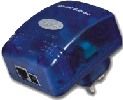 Networking accessories - these allow you to feed Broadband or a computer network around your home using your existing in-house electrical wiring - plug in a HomePlug to a power socket near your PC or router, and plug an RJ45 data lead into the HomePlug. From elsewhere in the house, plug in another unit, for access over the mains wiring. No new cables, no drilling, no mess.
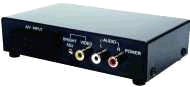 Not all set-top boxes and DVD recorders have a modulated output. In situations where no SCART or HDMI is available, you can still connect using aerial cable, with the help of an RF Modulator box.
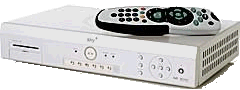 Personal Video Recorder - also known as a DVR (Digital Video Recorder). this is essentially a set-top box that has a built-in hard-disk (like a computer). This disk is used to record TV shows for playback at a later time, and is the replacement for a video recorder. You use an on-screen programme guide to select your favourite shows in advance, then let the PVR record your shows for you. Many PVRs allow you to watch and record different channels, pause live TV, rewind live TV, and set series links so you don't miss a favourite show. Probably the most well known PVR in the UK is the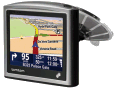
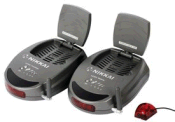 A video sender, sometimes referred to as an "AV Sender", is a set of equipment that can send video and audio from a piece of equipment to a TV set elsewhere in the house.
Got a tech expression you'd like our help with? Suggest a word
Share This Page:


