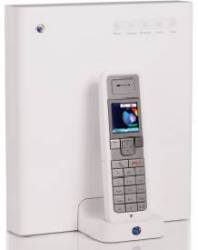
What is the BT Home Hub?
BT has a plan - and that's to get one of their Home Hubs into everyone's house. The FrequencyCast podcast team thought we'd fill you in on what the BT Home Hub is all about.
Essentially, the BT Home Hub is intended to be the main connection point between BT's network and your home. The Hub is intended to be the central point for communication - home phone, mobile phone, wireless networking, broadband Internet and television services.
In a nutshell, here's what the BT Home Hub is:
- A Broadband router: Allowing high-speed broadband connection to the Internet from home computers, laptops, mobile phones and games consoles (such as the Nintendo Wii, Microsoft Xbox or Sony's PS2 / PS3). Intended for use only with BT Total Broadband
- A Wi-fi access point: Supporting the connection of equipment that has wireless capability. This includes some PDAs, mobile phones, laptops and wi-fi webcams.
- Internet calls: The Hub supports phone calls made over the Internet, for cheaper calling with BT Broadband Talk
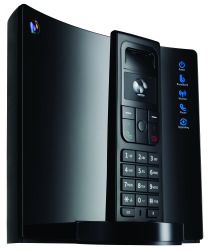
- Cordless phone: Connects with the BT Hub Phone digital cordless DECT phone (From BT Shop)
- Digital TV: The Hub is designed for use with BT's digital TV service, BT Vision
- Video phone: Works with the BT Video Phone 1000 (From the BT Shop)
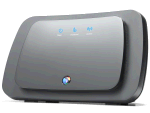
![]() The original Home Hub |
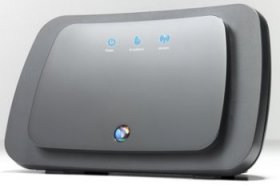
![]() Home Hub v1.5, released Oct 2007 |
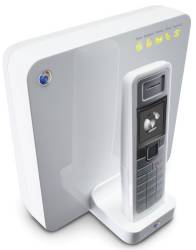
![]() Home Hub v2.0, released July 2008 |
Get a BT Home Hub:The BT Home Hub is available directly from BT:
|
|
BT Home Hub Review
We reviewed the original v1 BT Home Hub in Show 9 of our online radio show. You can listen online, or download the show to your MP3 player.
The first version of the BT Home Hub is actually a re-branded version of the Thomson Speedtouch 7G broadband router. Those with experience of broadband routers will be quick to acknowledge that BT's Hub is not the best router on the market and lacks some of the more advanced features found on other routers. However, for the majority of BT's target home users that want a free Broadband modem with their Internet connection.
If you want to read our review of the v2 Hub, see our Home Hub v2 Reviewed page. In summary, the Home Hub is usable, functional and free. It's pre-configured for use with BT's BT Total Broadband, voice-over-Internet and TV services, making it easy to use out-of-the-box for the less technically-savvy.
BT Home Hub is supplied with:
- Broadband cable
- Ethernet cable (RJ45)
- Power adapter
- 2 x ADSL microfilters
- User Guide and CD

BT Home Hub - Box contents
BT Home Hub 2.0 Specifications:
- Modem: ADSL (Broadband).
- Wifi: 802.11b / 802.11g / 802.11n (Supports WEP, WPA-PSK/WPA2-PSK)
- Dimensions: Width: 175mm , depth: 88mm , height: 182mm
- Main features: Pre-configured to work on BT Total Broadband lines
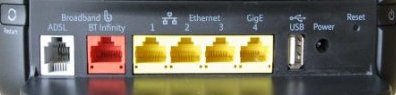
- Connectors: 4 x 10/100 Mbps Ethernet sockets (RJ45), 1 x USB, Broadband In (RJ11), telephone socket

Home Hub 2.0 rear connectors

Sockets on the rear of the BT Home Hub v1.5

Sockets on the rear of the BT Home Hub v1.0
Connecting the BT Home Hub:
Here's a quick summary of how to get connected to BT Total Broadband using a BT Home Hub:
- First off, each telephone in the house will have to be connected to the phone socket via a special filter once Broadband is enabled. Other devices that have to connect to your phone line, such as answerphones and set-top boxes (including the Sky digibox), will also need to be connected via a microfilter.
- Plug the broadband lead into the ADSL socket on the filter into the Broadband line socket on the Home Hub
- Plug the Home Hub into the mains, using the supplied power adapter
- After a few minutes, the 'Wireless' , 'Broadband' and 'Internet' lights should be on (The BT guide advises you to wait an hour while the line optimises and gains the fastest speed).
- Next off, you're meant to install the BT Total Broadband software, supplied on CD. HOWEVER, you don't need to. If your PC is running XP or Vista, you won't need to use the supplied BT software CD, as when you connect your Home Hub to the PC, Windows has all of the software you need. By not using the CD, you won't get lots of unneeded software installed, including: BT Broadband Desktop Help, BT Yahoo Internet Software, Hub Manager and BT Broadband Talk Setup. You can manage your Home Hub via a standard web browser, so don't need BT's software to clutter your PC.
- Then, plug in an Ethernet lead from your PC's network port to the Home Hub Ethernet port.
- As if by magic, it should all work. The Home Hub is set for DHCP, and BT Total Broadband doesn't require a username or password to log on (as they use your phone number to authenticate)
Knock some cash off your bill
More details at www.bt.com/creditcard. |
Configurating the BT Home Hub:
| Listen to our audio guide to the BT Home Hub, where we walk through the Home Hub's software! |
We thought that some of our visitors might like a little more detail on what configuration options are supported by the Home Hub, so we've had a stroll through the user interface:
You can connect to your Home Hub to check status and alter settings via your PC's web browser - Go to http://bthomehub.home/. Once you've logged in to the BT Home Hub, you need to go to the 'Advanced' section. Here, you'll find the following sections:
Configuration: Contains the following:
- Wireless - Set up the Hub's wireless settings : SSID , speed, channel, encryption (WEP, WPA-PSK or WPA)
- Telephony - BT Broadband Talk settings
- Internet - Info on your Internet connectivity. This includes your username and password - note that be default this is "bthomehub@btbroadband.com" (with no password) - these details aren't actually needed as authentication is done using your phone number
- IP Addresses - Here you can enable/disable DHCP, define a DHCP pool, and set the Hub's IP addresses and subnet mask.
- Devices - Shows the status of connected devices
- Application sharing - Allows you to assign port mappings (translation of incoming packets for a port range, to a local port range). More
- Firewall - Allows you to select levels of protection. More
- Dynamic DNS - Allows you to use a service such as DYNDNS so that machines outside your network can get your IP address
System: Allows a reset, restart, and the option to set the Home Hub to get the time automatically (Enter up to 5 NTP servers). Also has the 'Remote assistance' option, which allows BT's Support team to access your Hub.
Status: Info and access to a access to a number of event logs, including a call log and intrusion detection log

Screenshot of wi-fi setup on a BT Home Hub
If you're looking for general help with your Home Hub, check out our Home Hub FAQ. You might also like to take a listen to our Unofficial Audio Guide to the BT Home Hub.
If you need technical help with the Home Hub, we recommend you ask in the FileSaveAs Home Hub forum
| Listen to our audio guide to the BT Home Hub, where we walk through the Home Hub's software! |
Home Hub FAQ
| Software version | Software updates are 'pushed' to BT Home Hubs automatically overnight whilst they're connected to BT's system. See our Home Hub FAQ page for more on firmware updates. |
| Home Hub Versions |
|
| Home Hub on non-BT Broadband | We've been asked if the BT Home Hub can be used on Broadband connections other than BT Total Broadband.
|
| Home Hub with BT Vision |
This connects to your Home Hub using an Ethernet cable, and can let you watch live TV as well as downloaded movies and TV shows over Broadband. For more, see our BT Vision page, or go to get.btvision.bt.com. |
| Home Hub with another router | A few months ago, we asked for help via our FileSaveAs forum to work out a way of getting our BT Home Hub to work with an existing ADSL router and BT Total Broadband. This was so that could get broadband in two different parts of our office (ready for BT Vision). We found a solution in the end, and we've added it to our BT Home Hub FAQ |
| Home Hub with Video Phones | For information on hooking up a BT Video Phone to the Internet, see our review pages on the BT Videophone 1000 and the BT Videophone 2000 |
| Logging on to the Hub | To make changes to your BT Home Hub setup, you need to 'log on' to the Home Hub, from where you'll be able to access settings and diagnostic screens. You can do this from a desktop or laptop that has a working connection to the Home Hub. From a connected machine, use the web browser (Internet Explorer, Firefox, etc) and from the web browser address bar, enter the address: http://bthomehub.home and press Enter. If for any reason this doesn't work, you can also enter the IP address for the Home Hub (sometimes known as the gateway IP address). The default IP address for the BT Home Hub is 192.168.1.254 .
Audio Guide: More on this in our audio guide to the Home Hub - Click here |
| Can't log in as Admin |
If you're finding that you can't log on as Admin, and you've just upgraded to Internet Explorer 7, note that this appears to be due to an incompatibility issue between the Home Hub and IE7. When we used Home Hub software version 6.1.1M, we couldn't log in as Admin, but a new firmware version, 6.1.1R was released in November 2006 to fix this. Your Home Hub should automatically pick up and download this version while connected to Broadband, although roll-out of new software updates apparently may take a few weeks to get to everyone. Still having problems logging in? Do you have the latest version of Home Hub software? Ask for help in our Home Hub forum, including details of the error you're seeing. |
| Port forwarding | The BT Home Hub has a built-in firewall, to prevent external access to devices connected to the Internet via your Home Hub. There are times though, when you need to allow external devices to get through your firewall, such as online games or file sharing applications. The BT Home Hub allows you to do this using something called port forwarding. We get lots of requests for help with Port Forwarding on the Home Hub, so we've added some extra help:
|
| USB ports | The Home Hub has two USB connectors. We've had a number of questions asking what they can be used for - and we've added the answers to a special section in our Home Hub FAQ. |
| Home Hub with Vista | We've been asked if the BT Home Hub works with Microsoft Windows Vista. According to BT, the BT Home Hub is compatible with Windows Vista. There's a note that, as well as connecting via Ethernet or Wi-fi, the Hub can connect via USB and this requires special Windows Vista drivers. For more on the Home Hub and Vista, see
www.bt.com/vistasupport. If you need help with the Hub and Vista, please ask in the Home Hub forum. |
| Home Hub with a Mac | Thanks to Tom for helping us out on this one. He says: "Home Hub works perfectly with a Mac, and with a mixed Mac/ Windows network. It's advisable to use both Firefox and Safari when browsing the hub admin panel, BT sometimes write terrible code that only one or the other browser will digest correctly. The latest Firmware updates seem to have sorted most of this out." |
| Using the BT Hub Phone |
|
| File sharing | We've been asked if you can share files between two Windows machines connected using a BT Home Hub within the same house. Yes - it's possible - The trick is to get all of the computers to be in the same IP address range, to make sure the Hub and all PCs use the same subnet address, and to get the PCs to use the router's Gateway IP address. You also need to enable Windows XP file sharing. The Windows XP Networking tool can be very helpful with setting up file sharing and connectivity between machines. If you need more help, try asking in our Home Hub forum. |
| Leaving the hub powered on | The Home Hub is designed to be left on all the time, as without it, you won't get able to get always-on Broadband, voice-over-Internet or TV-on-demand services. Page 43 of the Home Hub manual under 'Please save energy' states: "Please disconnect the Hub from its power supply when not in use for an extended period, but remember when you do so, all connected devices (and any other devices that uses the hub to connect to your broadband line) will lose Internet access and BT Broadband Talk won't work" |
| Connecting via wireless | We've had a couple of questions asking about how to connect a device to the Internet, wirelessly. To help out, we have two resources for you:
If you need more help, best to ask in our Home Hub forum. |
| Can't see wireless? | Moved to our Home Hub FAQ page |
| Can't connect via hub | We've been asked by a site visitor for help getting his PC to connect via the BT Home Hub. It's important to make sure that the PC has an IP address in a range that the BT Home Hub can cope with. Here's a few things to check if you're having problems:
Network, IP and router problems can be complex, and if you need setup help, it's probably best to ask in our Home Hub forum. |
| BT Broadband settings | Need help with your BT Total Broadband email settings? Looking for the BT Broadband POP or SMTP settings? Having a problem sending emails via the Hub? For connectivity settings for BT Total Broadband, see the FileSaveAs BT Broadband FAQ |
| Connecting a PC | If you're looking to connect your PC to your Home Hub, you have two options:
|
| Phone with Broadband Talk |
|
| Two Home Hubs? |
|
| Enable / disable Wi-fi | To enable / disable wireless access to your Home Hub, log on as Admin, go to Configuration > Wireless and untick "Interface Enabled". |
| Wireless Channels | By default, the BT Home Hub comes with Channel 1 enabled on the automatic session. Many have found this setting causes repeated drop outs. Apparently, the BT help desk actually recommend you use channel 9-11 for best connectivity using the manual setting. (Thanks to Andrew for this note) |
| Wireless security | The BT Home Hub acts as a wireless access point, and to prevent other users accessing your wireless connection, you need to enable a level of security and encryption. The Hub supports the following wi-fi security types: WEP (64 or 128bit), WPA-PSK or WPA/WPA2.
The security encryption type you use can be set from the 'Advanced' > 'Configuration' > 'Wireless' > 'Security' menu. WPA is generally regarded as a better option over WEP encryption - When you select WPA, a pulldown menu appears, "WPA Version", offering WPA or WPA2 (the more complete version of the WPA protocol). With encryption, you'll need to enter a key phrase into the appropriate dialog on the Hub. Audio Guide: More on this in our audio guide to the Home Hub - Click here |
| Home Hub and PS3 | Thanks for Adrian for asking about a Playstation 3 and the BT Home Hub, in Show 13. He wants to know if he can go online with the PS3 and a Home Hub using an Ethernet cable. The PS3 has an Ethernet port, and can be plugged into a router such as the BT Home Hub with a standard male-to-make RJ45 Ethernet cable. The PS3 also supports wi-fi, so cab connect to the Home Hub wirelessly. |
| Home Hub and Health |
Moved to our Home Hub FAQ page |
| Resetting the hub | Thanks to site visitor johnny20whales for the following: One of the problems with the BT HomeHub is that the only apparent way to reset back to factory settings is via the browser interface (192.168.1.254) or the HubManager app. Here one logs in as the admin user and simply uses the soft Factory Reset (System > Reset). However this doesn't do a proper reset - it seems to leave some tables unchanged. In my case I kept coming against static addressing that I wanted to switch off which were unaffected by a software reset.
|
| Installation software | The BT Home Hub is supplied with a software installation disk. We've been asked where to get hold of a copy of this CD, by a user looking to reinstall the Home Hub onto a PC. The good news is, that you don't actually need to install software onto your PC or Mac to allow you to set up the Home Hub. The Home Hub is pre-loaded with software, and all you need to do is use a web browser on a machine connected to the Home Hub, and enter the address of the Home Hub to get access to the setup screen - more info If you'd be happier with a CD - give BT a call on 0800 800 150 for a replacement. |
| Remote access | We've been asked if the Home Hub supports remote access - so that you can connect to your Hub from outside the network - perhaps from work, over the Internet, maybe to change port forwarding. Click here for our answer. |
| Restricting access (Mac address) |
|
| Setting the time |
|
|
We featured the BT Home Hub in Show 09 of our online radio show, and we've covered accessories, including video phones, DECT cordless phones and the BT Vision tv-over-Internet service, in other shows.
We've also created a special Unofficial Guide to the Home Hub, which walks through some common Home Hub features.
See our Show Listings for details of what we've covered in our podcasts. Also, consider signing to our Mailing list for updates.
Need more help?
- If you need an answer to a Home Hub question, try our Home Hub FAQ.
- We've created an audio guide on how to complete some of common tasks on the Home Hub, such as how to set up wi-fi, improve reception, set the clock and forward ports. See our Unofficial Home Hub Guide.
- If you have a technical question about setting up the Hub, networking, voice-over-IP calling or wi-fi, ask in our Home Hub forum or our Network forum
- If you have a question about setting up the Hub for BT Vision, try asking in the BT Vision forum.


Version 1.5: In October 2007, BT soft-launched a revised version of their Home Hub, known as the BT Home Hub v1.5. This new hub is based on the original Hub, and appears to be using the same core software. Here are the main changes:

To get to some of the Hub's more advanced features, you need to log on as an Administrator. When you