







How to make a Podcast
This page outlines the basics on how to start out in podcasting, explaining what you need to know to get started, and what you'll need to make your first show.
Creating a Podcast
There are a few things you'll need to have before you can get your first podcast live:
- Hardware: You'll need a computer with a soundcard. You'll also need a microphone - you could look at a headset mic , otherwise look for a basic uni-directional dynamic mic with a suitable connector for your soundcard (a 3.5mm jack plug, not an XLR connector). You'll find an excellent selection of mics, stand cables, adapters and soundcards at maplin.co.uk or Dabs.com.
One of the main mics we use for our show, FrequencyCast, is the Shure C606W. This is a low-impedance mic, so a PC soundcard can't get enough amplification to do the mic justice. Rather than connecting straight into the soundcard mic input, we get best results by connecting our Shure mic to the soundcard's Line-in socket, via a microphone pre-amp to get the mic level up to 'line level'.
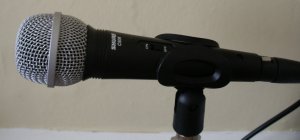
The Shure 606W microphone
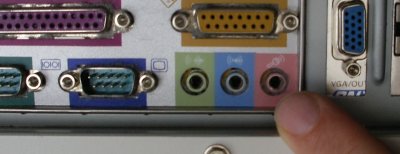
Microphone socket on a PC soundcard
- Software: You'll need some audio recording software to allow you to record, edit and tidy your podcast. You may find that your PC's soundcard came bundled with software, otherwise there are a few apps to try, such as WebPodStudio , PodProducer , Audacity, and at the top of the spectrum,
there's the professional audio package Adobe Audition, which is available direct from the Adobe UK online store.
- Webspace: You'll need to publish your Podcast somewhere on the Internet. You may also want to buy a web domain too, to give your podcast an easy-to-find web address. In the UK, take a look at our favourite (the hosting provider for our podcasts), namesco.co.uk
|
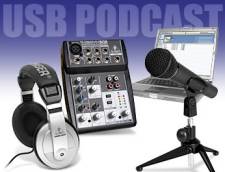

Recording a Podcast
Now you're ready to record your first podcast. You'll need to have a plan for what you're going to say, perhaps a script, and you'll need to have your voice warmed up.
Download and install your audio software. Here we're going to use the free Audacity package. Once installed, you'll be able to record audio from your microphone, and see it represented as a waveform onscreen. You can edit your voice file as appropriate, and add extra tracks (such as music or sound effects). The program is fairly straightforward to use, but mastering some of the advanced functionality may take some time if you're new to some of the concepts of audio editing. The good news is that everything is undo-able, so spend an hour or so exploring the software, and trying some experiments.
The screenshot below shows Audacity with a mono voice file over some stereo music.
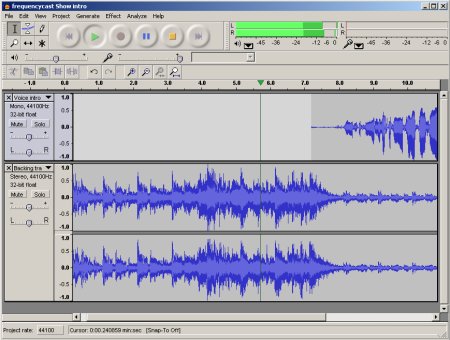
Editing with Audacity
A word about music. If you're looking to use music on your podcast, then be careful. Using commercial music by published artists is a no-no, unless you're prepared to pay the royalties. The music will be under copyright, and you'll need a licence to use the music on your podcast. In March 2006, the MCPS-PRS alliance launched a Podcast licence for Internet music podcasts - Find out more on the MCPS-PRS Alliance website. If you're still looking to use music on your podcast, but don't want to pay for a licence, then consider using non-copyright music - if you know a local musician that could compose you some music, that could be an option. If you're interested in getting a quote from the composer of our theme tune and backing tracks, please contact us.
Once you've recorded and edited your show using the software (as mentioned above), you need to export your recording as an mp3 file that's suitable for download.
- As a guide, consider making your file available as an MP3 file in the following format: 64kpbs at 44Khz. The lowest would be about 48kbps for speech, and for high-quality music, you'll be looking at 128kbps
- We have more on this subject on our MP3 format page
Publishing your podcast
Once you have your first audio file ready to send out to the world - you'll need to upload it to storage space on the Internet.
Your existing Internet provider may already provide you with some storage space online, otherwise, you'll need to find a decent hosting company, who'll sell you webspace for your recordings. Our shows are hosted by the UK Internet provider Namesco.co.uk, and we highly recommend them. If you're going for a hosted option, consider getting a good recognisable domain name from your Hosting provider.
Once you have storage space online, you'll need to upload your audio. Typically, you'll do this via FTP upload, using an application like Smart FTP.
Submitting your Podcast
Once your podcast is complete and uploaded to your webspace, then you need to tell the world.
If you have an existing website or weblog, use this to promote your podcast. At the basic level, all you need to do, is upload the mp3 file, then link to that file - Here's an example: Download our promo. Once the audio is live, and you have a download link in place, you next have to find a way of getting people to know about the podcast, and drive them to download it from your site.
Podcast Feeds: To get your show "out there", you should also create an RSS feed of your podcast - these are computer-readable files containing information about your shows.
 RSS feeds are typically identified to users with the little orange RSS icon, and inform the user that the link can be pasted into a podcast collector or RSS feed reader, so that new shows can be collected automatically. There are several applications that can help you create an RSS feed - Use Feedforall (Download free trial) or ListGarden to create an XML file that contains details of your podcast, then upload the XML file to your website.
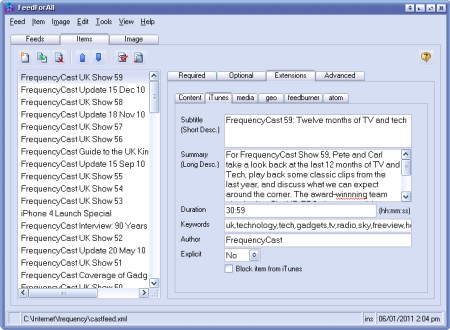
Creating a podcast feed with FeedForAll
If you're after an example, our show RSS feed is at https://feeds.feedburner.com/frequencycast
You should consider submitting your podcast RSS feed to some of the major podcast directories. Here's some places to start:
 iTunes
- By far the most popular podcasting service, you should definitely get your show onto iTunes. To submit a feed, you need to download iTunes from www.itunes.com and create an iTunes account. Although submission is free, you have to enter your credit card details to allow verification of your identity.
- PodcastPickle
- Podcast Directory
More information
- PodCast Studio kit reviewed - Our review of the all-in-one USB podcasting kit from Behringer.
- Live365
- Run a live, 24 hour-a-day stations from your PC
- Podcasting Hacks - There are three or four podcast books, but this is our favourite. It's an American book covering a number of "hacks" - not in the hacking sense - but "quick and dirty" tips to creating top podcasts.
- Podcasting news - Keep up to date on podcasting developments
- Audioshell - Handy MP3 Id3 tag Windows Explorer addon
- Olympus DS-30 - Handheld digital recorder ideal for portable podcasting (See also the professional Olympus LS-10 model)
- UK Podcast Advice - Want information or help with podcasts? Check out this site
- Podcasts on a PDA - An article on how to get podcasts on your handheld mobile device
Anything you'd like to see added to this page? Call 020 8133 4567 or send us a message
Share This Page:


