






Behringer Podcastudio Kit Reviewed
Podcasting is becoming more and more popular. We've been producing the FrequencyCast online Tech and TV show since April 2006, and we've seen a steady increase in listeners and feedback. With more and more people getting to grips with listening online, and more folk with mp3 players than ever before, there's never been a better time to get into podcasting.
If you're considering making those first steps into audio exposure, then take a look at this all-in-one kit from studio equipment manufacturer Behringer. We have a page on DIY podcasting, but thought we'd devote a page to this kit - explaining what the Behringer Podcastudio offers, and answering your questions (if we can).
What is the kit?
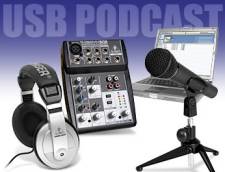 To record your first podcast onto your computer - you need a microphone, some software, and a way of connecting the mic into your PC. That's the basics, but as ever - it's not quite that easy, and that's where this kit comes in.
If you're looking to get started with recording audio onto your PC, or creating your own podcast, this kit is a great way to start.
It's made by industry-name Behringer, and this podcaster's kit includes a 5 channel mixer, USB audio interface for your PC or Mac, a dynamic microphone, mic stand, and a set of headphones.
It also comes with a CD of software, including the Audacity package - this will allow you to record and mix together a podcast or audio demo tape.
This is pretty much all you need to be able to record, mix and publish your podcast. The only thing not included, is the webspace to store your finished audio... for that, you'll need to find a hosting company.
Availability
Alternatives? The Pinnacle PodCast Factory from Maplin. |

What's in the Kit?
The Behringer Podcastudio kit comes in a big yellow box, and here's the contents:
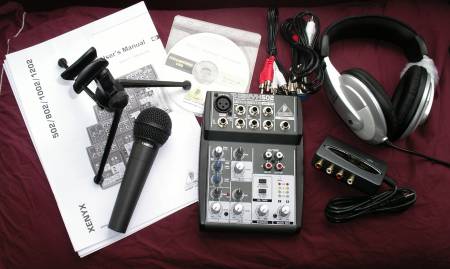
Contents of the Podcastudio box
The Podcastudio box contains the following:
- Mixer: Behringer XENYX502 - 5-channel mixer with XLR mic input and preamp. Plus mains adapter
- PC Interface: UCA200 2/2 I/O USB audio interface
- Mic: XM8500 dynamic microphone
- Headphones: Behringer HPM1000 (with 3.5mm jack to 1/4" adapter)
- Mic stand with mic clip
- Cables: 2 x stereo phono cables, 1 x XLR cable
- Other: Software CD, manuals
Review of the USB podcaststudio
The podcastudio product from Behringer is a great little product and ideal for anyone looking to start out in podcasting, or looking to record audio onto a PC (perhaps for a voice demo tape or streaming radio service). To get the mixer, mic, preamp and USB soundcard for under £100 itself is pretty impressive, and it's all very usable.
Here's a quick overview of how to hook it all up:
- First - connect the USB audio interface to a USB port on your computer. Our Windows XP PC picked up this interface, the Behringer UCA200, and didn't need to install any extra drivers. (Mac apparently is supported, but we're PC people here, so we didn't check).
- Next, connect the mixer to the USB interface using two sets of supplied RCA phono leads.
- Then, plug the mixer into the mains.
- Set the mic on the stand, and plug the mic into the mixer using the XLR lead
- Finally, install the supplied software. The package supplied is called Audacity (which is actually available as a free download), although you should be able to use other audio editing software.
With all the connections made, it's a case of starting to record. We had to do a little jiggling around with settings on the PC. Out PC already had a soundcard, and the USB interface is effectively another soundcard, so we have to make sure the recording software was looking at the right card. You may need to look in Control panel (Start > Control panel > Sound and Audio devices), as well as the hardware setup in the audio recording app (from Audacity, Edit > Preferences > Audio I/O. From Adobe Audition: Edit: Audio hardware setup).
Once the software is set to record from "USB Audio", you can start recording. The mic is on Channel 1 of the mixer. Set the volumes, and away you go...
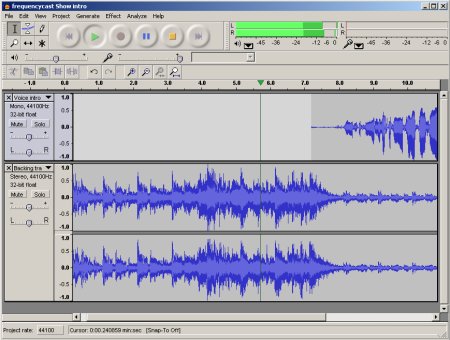
Editing with Audacity
The Mixer
For those looking for more details on the mixer... well, it's a basic Behringer XENYX520. It has five mono channels - Channel 1 for the mic, and four line level input, grouped 2/3 and 4/5 for two stereo inputs. There's a pan on the mic input, balance on the four other inputs. Mic has HF and LF EQ, and an LED to indicate clipping. For the out, there's a main mix output gain and headphone volume. There's an 8 LED level meter, and a single headphone socket. There's a "CD/Tape to Phones" (to allow you hear the return feed from the PC), and the option to add the PC return to the mix (with the "CD/Tape to Mix" button). The mixer has something called 'British EQ' for that warm sound.
- Dimensions: 134 x 177 x 47 mm
- Inputs: 1/4" mic input, XLR mic input, 4 x 1/4" line level, 2 x RCA phono sockets (CD/Tape monitoring)
- Output: 2 x 1/4" line level, 2 x RCA phono sockets (CD/Tape feed), 1/4" headphone socket
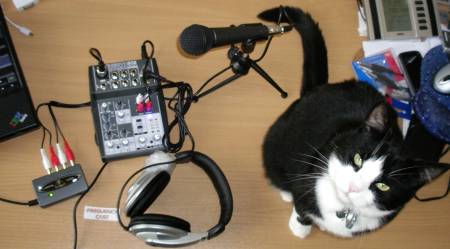
The office cat, interviewed using the Podcastudio
Podcastudio Summary
This is a capable little podcast kit. Everything needed to get a podcast recorded and mixed is here - and all that's left is to get some webspace to put the podcast mp3 file.
The mixer's very cable and of decent quality. We've had the show's presenters Pete and Carl playing with the kit, and they're generally impressed. The headphones probably are the weakest link... but then our podcasting studio's spoiled with sets of Beyer DT100s, which are professional broadcast radio headphones and more expensive than the whole of this kit.
In summary, if you're looking to get started in recording audio to your PC, and you're looking for something better than simply plugging your Skype mic into your PC's soundcard... then this kit's for you. The mixer allows for other inputs, such as a minidisc, iPod or tape deck too, and you can also connect the mixer to a tape deck or CD recorder if you want to mix to something other than the USB soundcard. Recommended, and a snip at less than £90. July 2007.
If you want more on making your own podcast, see our DIY Podcast page.
USB Podcast Kit FAQ
| Software updates | For software downloads associated with the USB Podcastudio package, go to the Support page at Behringer. |
| Software | The CD of software includes: ASIO2KS audio driver, Audacity audio editor, Kristal multi-track audio sequencer, Golden Ear and Juice. Pedro asks: "I would like to know if I can use It with a different software (for example, cakewalk sonar or Cubase sx3 instead of audacity) - Yes, you can. The mixer has standard phono outputs that connect to a supplied USB soundcard. Outputs from that soundcard into your PC appear as standard audio inputs that can be picked up by other sound packages. We use Adobe Audition with ours (see below). |
| Live broadcasts | Question: "Just wondering if this podcasting kit is able to feed live onto a web page, or is it just for recording and then playing later? (Rob Foley, Oct 2008) |
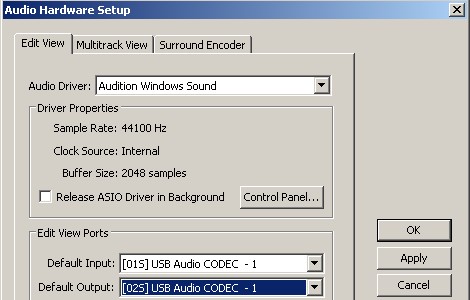
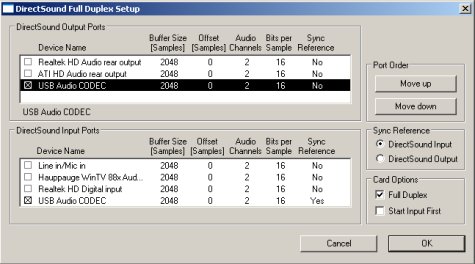
| Adobe Audition | Rather than using Audacity with the Podcast Kit, we're using the Adobe Audition v2 audio editing package. Audition, although expensive, offers features not found in the free Audacity package. When setting up Audition, we had a couple of problems, and the notes here might help someone else that's having the same problem. When trying to get a return feed to the mixer from the PC using Adobe Audition, we found we needed to install the ASIO audio driver - but we didn't get this to work. Instead, we found ASIO4All, which worked a treat. As for recording audio from the mixer using the supplied USB card, to get the mixer to connect and work with Audition v2, we had to go to Audition's "Edit" > "Audio hardware setup" dialog. Here's a screenshot of how we've configured Audition:
With these settings selected, press 'Control Panel...'. This is what we have:
|
Got a question? Contact us and we'll try to help, or make a comment in our Podcastudio blog entry
More information
- DIY Podcast - Our page of information on how to make your own podcast.
- Podcasting Hacks - There are three or four podcast books, but this is our favourite. It's an American book covering a number of "hacks" - not in the hacking sense - but "quick and dirty" tips to creating top podcasts.
- Podcast Advice - Want information on podcasts? Try here
- Podcasts on a PDA - An article on how to get podcasts on your handheld mobile device
Share This Page:


