






Slingbox Reviewed by FrequencyCast
In our third show, we took a look at the must-have TV accessory, Slingbox. This lets you watch your home TV over the Internet.
|
Slingbox was reviewed in Show 03 - have a listen!
|
What's a Slingbox?
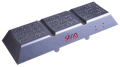 It's a small box that you connect to your home TV setup and to your broadband Internet router. Once it's connected, you can watch your home TV over the Internet from wherever you are in the world - anywhere there's an Internet connection. With a Slingbox, you can watch Freeview, Sky Digital, Virgin Media cable, or even a DVD in your lounge, over the Internet wherever you are.
As well as watching TV, you can also take remote control with a virtual controller, to switch channels, look through your on-screen programme guide, or set-up a recording on a Sky+ box.
The obvious use for a Slingbox, is to watch telly from your home country while you're outside of the country, or watch your home TV from someone else's PC (or heaven forbid, watching your home telly while you're at work!).
As well as being able to forward the sound and vision from a connected Sky or Cable box, the Slingbox has a built-in Freeview receiver so that you can watch Freeview channels remotely (as long as the Slingbox is connected to a suitable TV aerial.)
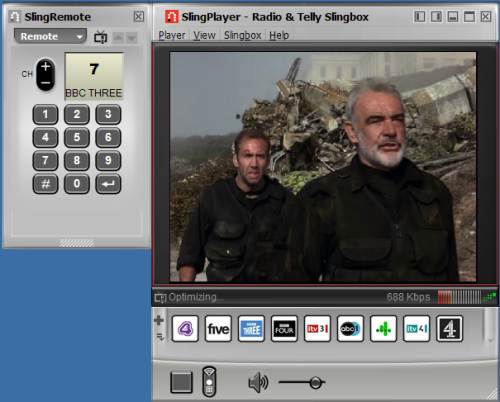
Using a Slingbox to watch home TV online
|
The Slingbox Classic is available from the following online retailers:
The Slingbox Solo (an update on the classic, with better video compression) is available from the following online retailers:
The Slingbox Pro (more video inputs) is available from the following online retailers:
Got a laptop? Get your Slingbox TV via T-Mobile Web ' n' Walk - this PCMCIA card supports GPRS, 3G and wi-fi, and at the time of recording, it's cheaper than Vodafone's mobile data offering. |
FrequencyCast Show 85 - Includes an interview with Sliongbox makers, EchoStar |
How Slingbox works
When using a Slingbox, there's a "send" end, and a "receive" end. Let's take a basic example. Let's say at home you have Sky TV and you want to be able to watch your home Sky TV over the Internet. The "send" end is your home. At the "Send" end:
- The Slingbox stays at home - You connect the output from your Sky TV box to the Slingbox
- You connect the Slingbox to your home broadband, using a Broadband router
At the "Receive" end:
- You install the Slingbox Player software onto a PC or Laptop
- Connect your PC to the Internet
- You set the software to tune in to the Slingbox at the "send" end, and watch TV over the Internet.
Once set up, on a remote PC, you have to download the Slingbox Player software, and enter the unique ID of your Slingbox - it then connects over the Internet, and lets you start watching. A pop-up onscreen remote control lets you change channels and take control of your set-top box, DVD, etc.
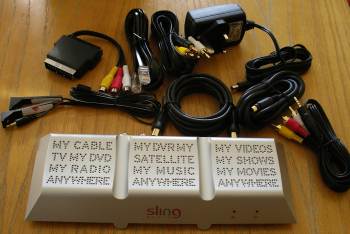
Slingbox is supplied with all of the bits of wire you'll need to get it hooked into your system, including: Two sets of Audio-Video phono cables, an S-Video cable, a SCART-to-A/V phono adapter, the Infrared remote cable, and Ethernet networking lead, a co-ax aerial cable, the power supply and a Quick Start guide.
Our summary? A nice little gadget - especially good if you have Sky+ and want to be able to set up your box to record while you're out. Also - having access to your TV via the Sling Mobile software on a mobile phone is rather handy too. We like Slingbox!
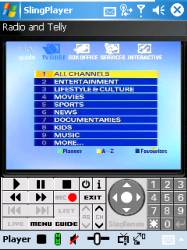
Sling Player controlling Sky+ on a mobile
Slingbox can also be accessed on a Windows Mobile handheld or smartphone. In 2006, a version for Symbian smartphones was launched - check out UK operator 3's X Series for details of a package offering Slingbox on a high-speed mobile network
We covered using Slingbox on the move in a recent article for Palmtop User Magazine. Read the article at www.filesaveas.com/otn13.html. We've also recently added a Mobile TV page
Your questions:
Q. My mobile has 3G and Wi-Fi. Can I use this to connect to the Slingbox to see TV in mobile phone. If so, how can I do it? Klhon, Mar 07
A. Slingbox can be run on a mobile phone, but at the time of writing, the Slingbox player software is only available for phones powered by Windows Mobile or Symbian OS v9.1 (the Nokia E65 on 3's network). If your phone is powered by a supported operating system, then you should be able to use Slingbox on the move. You'll need to install the software from Slingbox, then set up your 3G, GPRS or wi-fi connection for Internet access.
Q. CCTV over Slingbox: I have a conventional CCTV system with 4 analogue cameras that feed into a CCTV receiver which in turn is connected to a TV screen via scart. I would like to broadcast the video signal on the net so that it can be accessed by me from anywhere in the world via PC. Is the Slingbox my best option? Saj Aya, Apr 07
A. It should be possible to use the Slingbox to transmit the output of a CCTV system to the 'Net, provided that the CCTV system outputs standard video, and you can physically make the connection (the Slingbox comes with a set of leads that should be all you need, but you may need an adapter). Where you may have a problem, could be with any remote control access that you may need. The Slingbox supports sending of remote control commands over the net, but only for certain equipment. You'll probably find that controlling your CCTV system with a Slingbox may be a problem.
Q. How do I get my Slingbox to work with a BT Home Hub?
To use a Slingbox with the BT Home Hub, you need to connect an Ethernet lead into one of the spare Ethernet ports on the BT Home Hub, and then set up the Slingbox to allow port number 5001 to be forwarded from the Home Hub to the Slingbox. We have some information on how to do this on our BT Home Hub Port Forwarding FAQ, and also in our audio guide (see below).
Download the guide or listen online.
|
 BT Home Hub Audio Guide. We've recorded a special show about setting up the BT Home Hub. 17 minutes into our audio guide, we discuss how to get a Slingbox to work with a Home Hub.
If you still need help, best to ask in our Home Hub forum, giving as much information as possible.
Q. Power: Does the PC connected to the router need to always be on or can it be switched off once the Slingbox is activated? I'm interested in this device as I'm away from home for days on end, but don't want my PC to always be running. Ian Kell Aug 2007
A. If you're using an Broadband router to connect directly to the Internet, and you can connect your Slingbox direct to the router (not via your PC), then you won't need a PC powered up at the 'transmit' end.
Q. Do I need a fixed IP address to use the Slingbox? Gabor, Oct 2007
A. No. Slingbox uses something called a Finder ID. The Slingbox transmits this to a central location, and the Sling Player uses the Finder ID to identify the IP address of the Slingbox hardware.
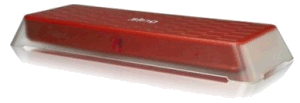
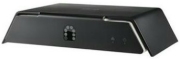
A. We covered the Slingbox pro back in Show 20. The Slingbox Pro. The pro adds composite, component and HD video inputs, improving on the original Slingbox's connectivity options. It has a new-look case, and can cope with higher video transfer rates - up to 8 Mbps. Click for Slingbox availability
Q. Bandwidth: Is there a limit to the bandwidth needed to watch Sky on a live feed? I'd be looking to watch Sky from my other house in France... however we only have a 1Mb ADSL connection? James Pothecary, Jan 2008
A. Slingbox needs somewhere between 250-750 kilobits per second for a watchable picture - the more the better. Note that the broadband download speed is not always the main issue with Slingbox though... The Slingbox uploads video to the Internet, and in the UK, upload speeds are a lot slower than download speeds. Typical upload speed in the UK is between 400kbps and 500kbps, and even if you have an 8Meg download connection at the receiver end, your transfer rate is only going to be as good as the rate that the video is up-streamed. Check your upload speed from the UK.
Q. Can I watch the output of Slingbox on a TV, not a PC?
A. Finally - yes you can, as there's now a gadget called a Sling Catcher. These are now available from Play.com and BT Shop
Q. Radio over Slingbox: Thanks to David Beck for reminding us that the built-in Freeview receiver on the UK Slingbox can't cope with radio - it only handles TV. One workaround is to connect a basic Freeview receiver to the Slingbox and use that for radio slinging. Not ideal, but it is at east possible.
Q. Problems: I own a Slingbox in the US. I am in Saudi Arabia. It worked fine until about a month ago when it failed to connect. My remote control does not appear and the dropdown menu to activate the remote control is shaded. What could be wrong?(Robert E Lee, March 2008)
A. Our guess is that it's most likely an issue at the "Transmit" end. A few suggestions - Get someone to reboot the Slingbox at the Transmitter end, by unplugging the Slingbox power lead for 30 seconds. Make sure when the box restarts that the lights on the front indicate that it's working and has an Internet connection. Try connecting using the Finder ID, not the IP address, as IP addresses can change. Get someone at the Transmitter end to confirm that the box is working locally - can they watch from a PC or laptop that's connected to the same router as the Slingbox? Is the Slingbox plugged in, and is the Internet connection working at the Transmit end? Has someone changed the firewall settings at the transmit end?
Q. Dial-up?: I have a property in Spain and would like to use a Slingbox to access programs there. In Spain we only have dial up connection. Is it still possible to receive any reception on dial up? (Marlene Wilton, Sept 2008)
A. The minimum speed you need to get a watchable live video stream is upwards of 200kbps. Dial-up offers 56kbps if you're lucky. By setting Slingbox to the lowest possible quality, and viewing in a fairly small playback window, it's possible to watch Slingbox using dial-up, but it's not a good experience.
Q. Mobile Broadband: I want to use Slingbox while camping in remote locations. Can I use a mobile broadband dongle with a laptop to watch TV from Slingbox? (John Payne, Apr 2009)
A. Yes, provided you can get a decent connection, then you can connect a USB mobile Internet dongle to your laptop and watch TV streamed from a Slingbox.
One thing you need to be careful of is the cost. To get a watchable Slingbox stream, you'll need to be getting at least 200kbps. Most Broadband dongles limit the amount you're allowed to download. Assuming a connection of 200kbps, that'd eat up 1 gigabyte of download in about 11 hours. At 1 Mbp/s, that'd be 2 hours per GB of your download allowance.
More on USB modems in Show 38 or our podcast, or on our Mobile Broadband page
Q. Can I watch the output of a Sky+ box that's connected to a Slingbox on my iPhone?
Yes you can. There's an app for that. Download the Slingplayer application for the iPhone from the iTunes App Store:

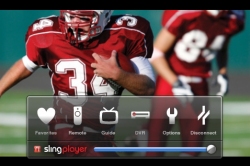
Slingplayer app on the iPhone
Q. Channels: When I change channels in Norway, the family in London get upset, because their channels change as well. Is there no way you can have the two locations in command of their own TVs?
A. The UK Slingbox Classic has a built-in Freeview receiver, so if you connect a TV aerial lead to the Slingbox, you'll be able to watch the Freeview channels remotely without disturbing anyone else's viewing. If you're using Slingbox to control a set-top box (Virgin or Sky for instance), you could always get a second box for use with your Slingbox - for Sky, consider Sky Multiroom.
Got a question on the Slingbox that we can answer in our next podcast?
Call 020 8133 4567 or send us a message
Related link
Share This Page:


