This page explains the basics of what Sky Digital has to offer, and answers our listener’s common questions about Sky’s UK satellite TV service.
Listeners to our free podcasts will know that we’re often covering Sky Digital in our shows. Our full Sky Digital review was in Show 16 and we looked at Sky+ HD in Show 23.

Sky Digital set-top digibox and minidish
Listen to Show 16, covering Sky Digital & Sky HD:
|


What does Sky offer?
Sky has been in the business of providing TV to the UK since the 1980s. They now offer a satellite service beaming hundreds of channels into home in the UK and Ireland, including a large number of Sky’s own channels.
The UK is due to switch to digital TV by 2012, and Sky is at the forefront of that switch – they’re also offering cutting edge viewing services such as high definition and Sky+.
Sky Digital offers the widest selection of digital TV channels in the UK – admittedly, there’s an awful lot of tat, channel-wise (quiz shows, Babestation, shopping channels, etc), but there’s a high number of quality channels too. Here’s what we think are the key benefits of signing to Sky:
- Channels: Sky offers the widest range of channels of any other digital service in the UK. Channels include: Sky One, Sky Atlantic, Comedy Central, SyFy, G.O.L.D, Disney, Sky Living, E4, More 4, BBC Three, Film4, Discovery, History Channel, MTV, BBC News and EuroSport.
- Sport & Movies: You can optionally subscribe to 10 channels of movies, or the various Sky Sports channels.
There’s also Sky Box Office, where you can watch latest film releases on a pay-per-view basis. More on Sky’s Sporting offers here: Sky Sports Packages. - Quality: Sky covers 98% of the UK population (far greater than the UK Freeview coverage). As it’s delivered digitally by satellite, the quality is excellent, and not susceptible to interference or the same level of pixelation that you may see on standard TV or Freeview. The boxes are well equipped, supporting widescreen, surround sound, two SCART sockets, and two aerial feeds for other TV in the house.
- Technology: Perhaps consider paying a little extra and going for Sky+. A Sky+ box records TV shows onto a built-in hard disk. It really will change the way you watch TV. Record two different channels at the same time, pause and rewind live TV, and take advantage of the EPG, to browse and select shows to record up to 7 days in the future.
- Sky HD: Sky’s now offering over 50 channels in stunning Hi Def. If you’re serious about your TV viewing, consider going for Sky+ HD to get High-definition TV.
- Extras: There’s quite a few little extras available to Sky subscribers, such as Sky’s Movies-over-Broadband service and Sky TV on a mobile. If you have Sky+, there’s remote record that lets you send your box a text message to get it to record a TV show. There are some optional goodies you can buy, including a Sky Link, which lets you switch channels from another room. There’s also the Sky Player – Sky content over the Internet.
- Free Broadband: Sky now offers free broadband to its TV subscribers, which is a pretty good offer. You’ll need to take out Sky Talk to get inclusive Broadband.
Should I subscribe?If you’re thinking of signing up with Sky Digital, here’s why now’s a good idea:
Alternatives?
|

 Consider the BT Vision "TV Pack". Over 7,200 on-demand TV shows over Broadband, plus movies and sport.
How to get Sky or Sky+ HD
Getting Sky Digital is pretty straightforward – you can phone up and arrange a booking, but you’re better off booking online at www.sky.com/skycom, as there are some Internet-only offers, and you can see what packages you’re selecting.
Want a basic guide on how to get Sky? Sky Basics
Once installed, you’ll be able to use the free digibox to select from any of the hundreds of channels – you also have access to pay-per-view movies, and a wide selection of radio stations. A top selling point, is Sky’s Electronic Programme Guide, which is even more powerful if you go with the Sky+ option (explained below). Here’s a screenshot of the Sky programme guide:
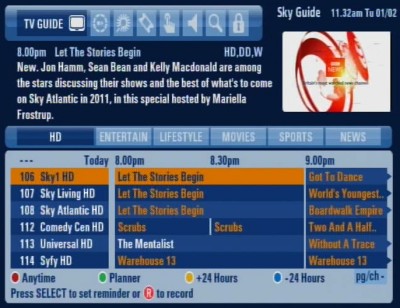
Sky’s on-screen Electronic Programme Guide
As reported on our podcasts, TV in the UK will be all-digital by 2012, and if you’re going to go digital, Sky’s offering will give you the widest number of channels currently on offer in the UK.
Sky’s offers:
|
 Looking to get Sky? Sky’s always running offers to get you to sign up – these include free set-top boxes, free installation and vouchers for High Street retailers.
Getting Sky Digital installed:
To get Sky, you’ll need to pick which package you want and arrange an installation date (which includes weekends).
- Package: You build a custom subscription based on their channel packs – the basic package is Entertainment with the optional Entertainment Extra package covering the full range of channels. You can also pay an additional monthly fee to sign up to Sky Sports and/or Movies packs.
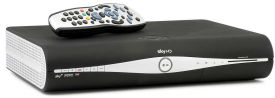
- Equipment: You can opt for a basic receiver, or go for the Sky+HD box (which has a built-in hard disk recorder, for recording shows, series link and live pause). You can also get an extra box for elsewhere in the house, with Sky Multi-room
- Installation date: When ordering from Sky, they’ll be able to confirm the earliest installation date. In our area, the first available day was four days after ordering. In many areas, Saturday and Sunday installation is available. Installations will typically take place between 8:30am and 5pm on the day of your choice, and you get a call from the installer on the morning, to let you know what time to expect them.
To order, you can either phone Sky and arrange sign-up over the phone (dial 08705-800 874), or take advantage of their online specials by signing up over the web at www.sky.com/skycom.
Details of Sky’s Extras
| Sky+ HD |
At the time of writing, over 60 channels of HD are available, including: BBC One HD, BBC Two HD, ITV1 HD, Sky One HD, Channel 4 HD, Five HD, Sky Atlantic, Sky Living, National Geographic HD, SyFy HD, Discovery HD, the History Channel HD, 3 Sky Sports HD channels, ESPN HD, several screens of Sky Movies HD, Sky Arts HD, plus pay-per-view Box Office movies in HD.
|
| Sky+ |
The Sky+ box is normally available for free when ordering online. There is no ongoing subscription cost for using the Sky+ service if you subscribe to any package. |
 HD offers a higher quality picture with more vibrant colours, greater detail, crisp clarity and amazing sound quality. Sky is currently leading the field, offering a Hi Definition set-top box and subscription, and the strongest lineup of HD programming currently on offer in the UK.
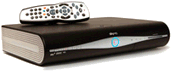 With Sky HD, you get a top-of-the-range Sky HD box that has Sky+ functionality and a huge hard disk.
  You’ve probably heard the hype about Sky+. This is described as something that will change the way you watch TV. It’s a combined satellite TV receiver and a digital TV recorder that automatically records TV onto a built-in hard-disk. This gives you a huge amount of control over how you watch TV. The Sky+ box lets you:
Common Sky Questions
| Connecting Sky |
We’ve had a mail from one of our listeners who’s having problems connecting her Sky box to her. Here are a few notes:
High-definition: If you have a Sky+HD box and an HDTV, you can get high-definition TV by connecting between box and TV using an HDMI cable, and not a SCART cable. More help? There’s a lot more information on how to connect set-top boxes on Radio and Telly’s Connection Help page |
| Sky TV in multiple rooms |
If you want to watch Sky TV in more than one room, there are two main ways. One way is to send the output of your Sky box to the other TV set(s). There are two ways of doing this:
With these options, you’ll be limited to watching what’s being shown on the Sky digibox. If you want to be able to watch different channels in different rooms, then you’ll want Sky Multiroom. Note that each box will be connected directly to your satellite dish. Each Sky dish can cope with a maximum of eight feeds (with a suitable octo LNB) – so the maximum is eight standard Sky boxes, or four Sky+ boxes. For more information about Sky Multiroom, or to order, go to sky.com/shop/boxes/sky-multiroom |
| Recording from a Sky box |
If you have a Sky set-top box, you might want to record Sky programmes onto a DVD recorder or a video recorder. Some things to note:
|
| Subscription-free Sky |
If you like the idea of getting extra digital TV channels via satellite, but don’t fancy paying a monthly subscription to Sky, there are some other options. There are several subscription-free channels that can be received with a dish and decoder – See Sky’s list of free-to-air channels. Here are the ways of getting some satellite channels without a subscription:
A lot of Sky’s channels require a subscription though – see www.sky.com/skycom to find out which channels are on subscription, and which are not. More information: See our page on subscription-free TV |
| Connect to a phone line |
To get a free or discounted Sky digibox, it’s a requirement that you have your Digibox connected to a phone line for at least 12 months. Why is this? Sky will provide you with a free or discounted box in return for you keeping the box connected to a phone line and signing their "Interactive agreement". There are several interactive services on Sky, using their Sky Active service, and you need a phone line for this functionality. Additionally, you can order movies on demand, or watch pay-per-view events, which require a phone line, so they know you’ve viewed a film/event. More at www.sky.com/skycom If you’re getting Sky to install a box for you, they’ll typically run a phone extension (shortish distances). Otherwise, you can use a Wireless Telephone Extender to use your home’s mains wiring as a phone extension. If you really don’t want to connect to a phone line, Sky will still let you, but you won’t qualify for the discounted box, and it’ll cost you more. You could also consider Freesat as an alternative to Sky – they don’t require you to connect to a phone line. |
| Sky on your PC |
It’s possible to connect the output from your Sky Digital or Sky+ box to your PC, so that you can view and record Sky TV on your PC (or a Windows Media Center PC).
There are a few ways to connect from your Sky box to a PC TV card:
Note that in the solutions mentioned above – all you can do is watch the output of your cable TV box from a PC. As the Sky box is only capable of outputting one channel at a time, you can’t watch one channel on your PC, while watching another channel on your main telly. Two workarounds: 1) Get Sky Multiroom, or 2) consider getting a Hybrid PC TV receiver and connect a TV aerial – Assuming you can get a Freeview signal, you’ll be able to watch Freeview channels on your PC. One other option exists – and that’s to get a PC card that’s got an onboard satellite decoder – with this, you take the feed directly from the dish into your PC card, bypassing the Sky box. the downside is that, as your PC doesn’t have a subscription card slot, you can only view the free-to-view Sky channels. |
 The output of the Sky box should be connected to your TV via a SCART lead. You should connect a SCART lead from the ‘TV SCART’ socket on the Sky box, to a spare SCART socket on the TV.
 Then, set your TV to view the output of the Sky box – Your TV’s remote should have an AV / Line In or Ext button to allow viewing of the external socket. The button may be labeled with an icon like the one to the right.
 Aerial lead: Connect an aerial (co-ax) cable from one of the Sky box RF output sockets, to the aerial input on the other TV in the house. You then need to tune the other TV set into the output of your Sky box. To check the channel number that your Sky box is transmitting on, Press ‘Services’ on the Sky remote, then type 4 0 1 (or 0 0 1 on a Sky+HD box) and press ‘Select’. Select "RF outlets". For co-ax connectors and extension leads, try
 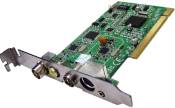 To do this, you’ll need a
You’ll find answers to some of your Sky questions on our Questions page, as well as in many of our podcasts
Listen to our show covering Sky Digital & Sky HD:
|
Got a question on Sky? Call our podline on 020 8133 4567
Other Links:
- TV & Tech Satellite TV Help – Your satellite TV questions answered