In September 2008, Sony launched the Sony Reader, also known as the PRS505. Could this do for books what the iPod did for music? On this page, the FrequencyCast UK podcast team takes a look at e-Books, and in particular, the UK Sony Reader.
|
Listen to our Sony Reader Audio Review |


More about eBooks:
Electronics books have been around for a number of years now – with novels, reference books and classics available to be viewed on handheld organisers and mobile phones.
From 2008, the electronic book market could be set for a radical expansion, as has recently been seen in the US. All it’ll take is for a decent electronic book reader to pop onto the market, with an e-Book store that makes buying, downloading and installing easy. It happened with MP3 files when Apple’s iPod and iTunes appeared – and we could see the same with books.
The Pro’s
- Convenience: eBook readers hold hundreds of books
- New technology: e-ink for easy reading, bookmarks, fast forward
- eBooks are kinder to trees, and cheaper
The Con’s
- Cost of the initial hardware
- Availability of books – millions of books not yet available
- Paper book technology’s been around for centuries – books work!
Chances are, like Marmite, you’ll either love the idea of carrying your book library around electronically, or you’ll hate the idea. We’re techies, and the idea of having a stack of books on a lightweight device that’s easy to read, works for us.
Listen to show 31, covering eBook readers:
|

For more on audio books, listen to Show 31, or download our 20 minute Audio Review of the Sony Reader.
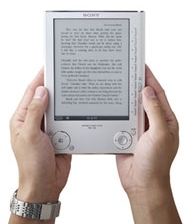 What is the Sony Reader?
In the US, Amazon.com recently released their Kindle – a handheld electronic book reader. It’s been very well received in the US, but didn’t make it to the UK until October 2009. Instead of the Kindle, the UK market has its own ebook reader – the Sony Reader.
In September 2008, the Sony Reader popped onto the scene to introduce electronic books to the UK.
This is a revolutionary electronic book reader. It holds around 160 books and uses a new electronic ink technology, so that what you’re reading onscreen is as close to the bookreading experience as possible. There’s no backlight, no flicker, just a crisp 6 inch screen full of readable text.
Some of the features of Sony’s new eBook reader include: a long battery life, text zoom, bookmarks. It can also read Word documents, PDFs as well as play MP3 files.
The Sony Reader comes with a CD of 100 stories to get you going, with loads more stories available direct from Waterstones
AvailabilityThe Sony Reader PRS-505 became available in the UK at the start of September 2008. In September 2009, two new models appeared – Get one online from Waterstones UK |
Sony Reader Review
The Sony Reader PRS-505 is a very impressive bit of technology. Key to this electronic book reader is the screen. It uses something called e-ink technology to display page content. You need to see e-ink to believe it. Essentially, the technology uses very little power, and only uses power the draw the screen – this is why the battery life is measured in page turns, not in hours (6,800 page turns per charge, by the way).
|
 Sony Reader – Audio Review
The screen is simply amazing – the type is crystal clear, and incredible easy on the eye. The technology doesn’t make use of any kind of backlight, so it’s not like looking at a laptop or a mobile phone screen – it’s pretty close to printed paper. Unlike a laptop, it’s very good in bright daylight, but no good in a dark room… in other words, it’s close to the paperback experience.
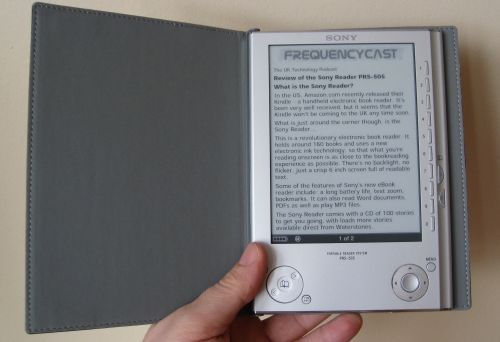
Sony Reader PRS505
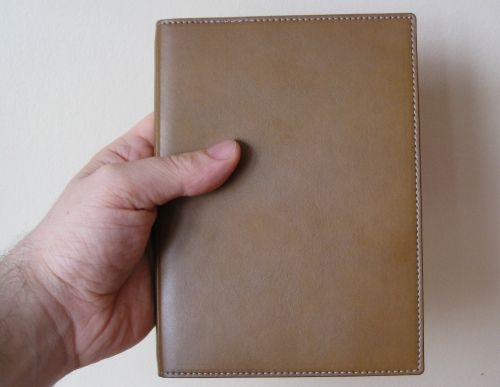
The Sony Reader comes bound in a tan leather-like case, and has a grey interior, to match the metal of the reader itself
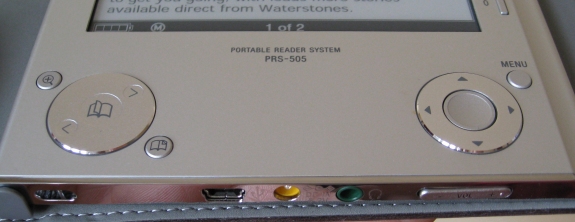
Using the Sony Reader is simplicity itself. There’s a little "on/off" switch at the top to activate the screen, and a number of buttons to help you get around. Here’s a summary of the buttons:
- Page back / forward – There’s a circular control below the screen, on the left for forward and back. There’s also two convenient buttons to the far right of the screen, ideals for one-handed operation
- Magnify – Three levels of zoom are supported
- Bookmark – A small button on the left for taking bookmarks
- Menu – To get back to the book’s menu, and to the Reader’s main menu
- Side buttons – Ten buttons down the right-hand side of the screen, for selecting books and selecting chapters, table of contents, etc
- Navigation – There’s a circular control on the right below the screen for navigating around certain pages – notably PDF documents, where you need to interact with the content a little
- Volume – Below the Reader, there’s a volume up/down, for headphone volume
The Sony Reader supports books in the EPUB format as well as Sony’s own BBeB format. It can also cope with PDF files, as well as plain text and RTF files. Microsoft Word documents can be handled too, but you have to have Word on your PC, and they lose some formatting when transferred across.
The Sony Reader can also handle audio files (MP3 and unprotected AAC files). You can also copy photos across, although the screen only supports shades of grey, so is only of questionable use for image storing. Having MP3 playback is a nice touch, as you can listen to music while you read, or of course make use of audio books from the likes of audible.co.uk (although note that Audible uses some formats that are DRM-locked and can’t be played back on the Sony Reader yet).
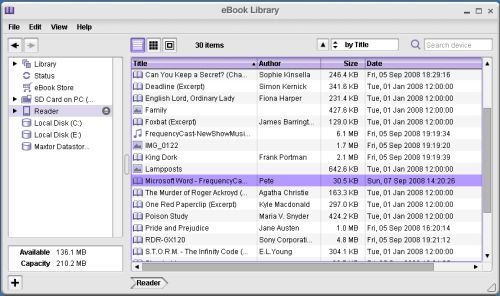
Copying content to the Sony Reader is pretty straightforward too. The Reader is supplied with a CD copy of Sony eBook Library. With this, you can import books, audio and photos into a Library, then copy them across to the Reader by plugging it into a spare USB port on the PC. The USB lead is supplied, and is also used for charging. If you don’t fancy using the software, the Reader appears as a drive in My Computer, for easy click-and-drag file transfer.
All in all, a surprisingly nice piece of kit, with an impressive screen. Although many won’t want to make the switch from a paper book to an electronic equivalent, there’s a lot of reasons why many will love this technology. Douglas Adams would have loved it…
Sony Reader Specification
- Model number: PRS-505
- Size: 175 x 122 x 8mm
- Weight: 250g
- DPI: 170 pixels per inch
- Book / document formats: EPUB eBook, BBeB Book, Adobe PDF, Microsoft Word, TXT and RTF
- Audio formats: mp3 and non-DRM AAC files
- Image formats: JPEG, GIF, PNG and BMP
- Memory: 192 Meg (approx 160 books). Expansion with Memory Stick Duo or SD memory card.
The Sony Reader is available online from Waterstones UK
Got a question? Let us know
eBook Formats
Here’s a quick look at the various e-Book formats:
| eBook format | File type | Details |
| EPUB | .epub |
EPUB is an open standard for eBooks. You can read EPUB documents on a PC or Mac using the free reader at Adobe Digital Editions. You can convert an HTML document to EPUB at BookGlutton Ebook readers: Supported by the Sony Reader |
| Mobipocket | .mobi or .prc |
Mobipocket is owned by Amazon.com. The service offers 40,000 titles available in 2008. Requires Mobipocket Reader, which is available for Windows PC, Blackberry, Windows Mobile, Symbian OS and Palm OS. Ebook readers: Supported by Cybook and iLiad eReaders. Amazon Kindle uses a variant of the MobiPocket format (AZW). Mobipocket is not supported by the Sony Reader |
| PDF (Portable Document Format) |
The document format is owned by Adobe. PDF readers are available for a number of platforms, including Windows, Mac, Linux, and a range of mobile phones and handheld devices. Ebook readers: Supported by the Sony Reader and Cybook |
|
| Microsoft Reader | .lit |
Microsoft’s eBook format Reader available for Windows PCs and Windows Mobile devices from www.microsoft.com/reader eBook readers: Not supported |
| eReader | .pdb |
Originally for use on Palm PDAs, the eReader is a free book reader available for the following platforms: PalmOS, Apple iPhone, Symbian mobile phones, Windows Mobile phones, as well as Windows and Macintosh computers. Available from ereader.com eBook readers: Not supported |
|
Your questions answered:
Q. "My books are on Palm eReader, can these be transferred to the Sony Reader? (Raymond, Aug 2008)
The Sony Reader doesn’t support Mobipocket (.mobi) or eReader (.prc) files. When you buy an electronic book that book is normally protected from being copied, using DRM (Digital Rights Management), which prevents you from copying or converting the eBook to another format. For that reason, it’s unlikely that you’ll be able to legally convert eBooks in other formats over to a format that can be read on a Sony Reader.
Q. "Could you please tell me if in the future there will be ebook docking stations in shops where we will be able to download and pay for there and then, instead of having to go on to the net and look for the book we want when we get home? (Annable Gallagher, Sept 2008)
As far as we know, there’s no-one offering this service in the UK at the moment, but someone could well decide to offer this service in the future. Readers like the Sony Reader support standard USB connection, and take standard SD memory cards, so there’s no technical reason why a retailer couldn’t sell books on SD card, or for instore download.
Q. "I am writing a number of books and would like to make them available as ebooks.
How do I ‘put’ them in ebook format and how do I stop them from being copied when someone has purchased one?" (Nigel Dinneen, Oct 2008)
Our team has no experience of creating a copy protected eBook, but as far as we can tell, you need to identify an eBook format, then use special software to create the file. There’s a whole stack of info on how to do this on Google – Do a Google Search. To ensure that it can’t be copied, you need to ensure that the file is DRM-protected (Digital Right Management)
Q. "Can I use this with my applemac?" (cjMcintyre, Oct 2008)
The software supplied with the Sony Reader only supports Windows XP and Windows Vista – At the time of writing, it’s not available for the Apple Mac. However, you can still use the Sony Reader – the Sony Reader takes standard SD cards, so you can copy books and documents from your Mac to the Reader via SD card. Also, the Sony Reader appears as a USB mass storage device when connected to a computer. Apparently you can also use the Sony Reader with a Windows installation on a Mac using Parallels/VMWare.
Q."How much are the books going to cost to load into the Sony Reader?…it could be counter productive if they were anywhere near the price of an actual publication." (G Walker, Oct 2008)
In general, ebooks are cheaper than paper counterparts, and of course, there are hundreds of free ebook available. Best advice is to look online at
Waterstones and compare some prices. As a test, at the time of writing, the number one book on Waterstones bestseller list is "The Angel Maker" by Stefan Brijs. This is £9.36 as an ebook, or £12.99 in hardback (a paperback is not available).
Q."I am British, but need a reader for living in Russia. Do the readers come with European plugs?
" (Cole David, Oct 2008)
The good news is that the Sony Reader charges its internal battery via a USB lead connected to a PC, not via a mains socket. If you need to connect via the mains, an optional mains adapter is available.
Q."I have a friend that is disabled and cannot use his hands. He wishes to use the Ebook reader.
Is there an infrared remote control or is there an interface that can be attached that will allow switches to be plugged in?" (Neil Scott, Oct 2008)
Sorry, but as far as we can tell, there’s no usable add-on to do this. Know different? Let us know.
Q. Charging the Sony Reader: "I shall be travelling with it and a laptop. How would I charge the former?" (Lois Radice, Nov 2008)
The Sony Reader charges its internal battery via a USB lead connected to a PC, not via a mains socket. If you need to connect via the mains, an optional mains adapter is available.
Q. Charging the Sony Reader: "Can the Sony eBook reader be recharged using a solar powered charger. We are going to Africa and the electricity supply will be doubtful if at all?I shall be travelling with it and a laptop." (Nel, Nov 2008)
I can’t see why the Reader can’t be charged via a solar charger, although I’ve never tested it. The Reader charges via a standard USB mini socket, or a 5.2V DC input.
Q. Sony Reader and Project Gutenberg: "Project Gutenberg has tens of thousands of free books available online, usually in plain text and html formats. Can the Sony PRS-505 show these formats?" (Andrew, Dec 2008)
The Sony Reader can handle TXT files, but you’re best off getting the books formatted in a more usable format, such as LRF. We’ve found an automatic Gutenberg converter here. Also, you’ll find that many of the PG books have already been converted to a Sony Reader format at manybooks.net.
Q. "I’m print impaired and looking for a e-book reader that would enable me to read 26 point Times New Roman without having to scroll" (Elaine, Nov 2008)
There is a way to allow you to install custom fonts on the Sony Reader. This is possible by using an application called PRS Customizer. It involves creating a new ROM file and installing the file via SD Card. The process should take around 15 minutes, and we’ve found a handy step-by-step guide on how to do this here.
Q. "Is there anything to stop me buying ebooks from Sony’s ebook store in the USA and using them on my UK bought ebook? I’m not finding the books I want at Waterstones in the UK but they are on Sony’s store in the US" (Philippa Napper, Dec 2008)
As far as we know, there is no technical reason why a book legitimately purchased outside of the UK can’t be installed on a UK Sony Reader. Perhaps try with a single cheap purchase? See also the comments in our Sony Reader Blog Entry.
Q. "I have a Sony Reader, which I think is a fantastic product. I’m trying to find an English Dictionary and/or Thesaurus in Adobe PDF or Epub to download to the Reader. I’m happy to purchase – not looking for a free one, unless you know of somewhere. Please can you help?" (Caz Taylor, Oct 2008)
Agreed – you’d think this would be an easy thing to find, but we’ve struggled too. Although thinking about it, without a search option, using such a reference tool might be a struggle. Still, if you can find one, Let us know.
Q. "GHow can I get my eBook Reader to show white text on a black background?"
Answered in show 79. See: eBook text on a black background.
 Q. "I would want to use this to read pdf technical documents, usually A4 and often in two columns. Is it easy to reformat these for the Sony PRS-505? Do diagrams survive the reformatting process?" (John McNeill, Dec 2008)
Yes – the Sony Reader can cope with two column PDFs, PDFs with tables, and PDFs with diagrams / photos. To give you an idea, we’ve taken a photo of a user manual with a table, images and two columns of text – not a great photo, as it’s hard to photo the screen, but it gives you an idea – click on the image to the right for a bigger image. This is a photo of the lowest of the zoom levels – two other zoom levels are available.
Got a question? Ask in our forum and we’ll try to help
Got a comment on the Sony Reader? Have your say
AvailabilityThe Sony Reader PRS-505 is available online from Waterstones UK |
More information
- FrequencyCast – This site’s podcast.
- Amazon Kindle – Amazon’s eBook
- MP3 Players – Our look at mobile media devices
- FileSaveAs Sony Reader Info – Help and advice on using the Sony Reader