In FrequencyCast Show 44, our tech team looked at MiFi, the wi-fi modem that converts mobile broadband from 3 into a wi-fi signal.
On this page, you’ll find a link to the show and a full transcript.



Transcript of Show 44‘s feature on the MiFi from 3:
Carl:
Aha, look what I’ve got here – bet you’ve never seen one of these before, have you? Look – a box of flashing lights!
Pete:
Lovely, I handed that to you ten minutes ago, so yes, I have seen it. What is it? – that’s the key question.
Carl:
No no – I know. No, I don’t know what it is, actually – what is it?
Pete:
OK, let’s give us a quick description, first of all?
Carl:
Right, well it’s about the size of an iPod or an iPhone, it has five lights on it, one in each corner, and one in the centre, and it’s a kind of silvery, well it’s silver, but it looks kind of white, it’s so silver, and it’s gorgeous – and look at that.
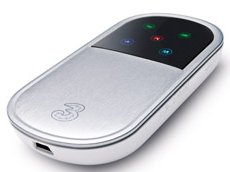
The MiFi Modem from 3
Pete:
What is it?
Carl:
I haven’t got the foggiest.
Pete:
Hmm, there you go. This is actually a MiFi.
Carl:
Is it? – are you sure?
Pete:
It is.
Carl:
Not on loan?
Pete:
No, it’s definitely MiFi. What this is is a portable wireless base station, so this will allow you to you send out a Wi-Fi signal to anything that’s in range, but it doesn’t need to be plugged in to a phone line like most wireless routers.
Carl:
But why do I want this one? Can’t I get one in a memory stick style thing, as a little plug in on the side of my laptop? Why do I want this again?
Pete:
Yeah, if you want to get the internet on the move, there’s a couple of ways you can do it. Obviously you could do it with a mobile phone, something like an iPhone, or you can get these USB dongles. They plug into your laptop, and they’ve got a mobile phone receiver in it, so you can get internet on your laptop over the mobile phone network. This is kind of similar in that it is getting its data from the mobile phone network, but it radiates out a signal through Wi-Fi.
Carl:
So we’re all going to get radiation poisoning, yeah?
Pete:
No, nothing to worry about there. But the beauty of this is, with a USB dongle obviously you’re limited to plugging it into one lap and having one connection. With this thing, for a start multiple devices can connect into your Wi-Fi.
Carl:
So what you’re saying is, you pay for it, and everyone else benefits – is that right?
Pete:
But there is some security in there to protect you from that, but more importantly, if you’ve got a Wi-Fi enabled device that doesn’t have a USB socket, say something like a Nintendo DSi, or an iPod Touch, or an Internet radio, then you can use one of these, connect over Wi-Fi to the mobile internet, get data speeds of 3.6 MB per second, which is pretty impressive.
Carl:
Very impressive.
Pete:
And they’re rather nice little bits of kit, new out, and they’re available from 3.
Carl:
So really though, this is more of a business investment, is it not? – if you can do multiple connections? I mean, you can have a meeting and you could all be using one Wi-Fi connector?
Pete:
Yeah, absolutely, or certainly for leisure use as well.
Carl:
So how much would I pay for this – £130?
Pete:
£70 one-off cost, which is actually pretty reasonable, and you’d be paying a monthly fee for the data, you get five GB a month for £15, a month’s subscription. The good thing though is you’re not tied into a 12 month contract, it’s a one month rolling contract, which means if you’re sick of it, you can just cancel with a month’s notice, which is pretty good.
Carl:
That’s quite a good investment then.
Pete:
So there you go, so that’s the MiFi available from 3.
|
The MiFi from 3 costs a one-off £50, plus £15 a month for 5GB of downloads. Details at three.co.uk/Mobile_Broadband/MiFi |
|
Listen to FrequencyCast Show 44 – MiFi from 3 |
More Show 44 transcripts:
More information:
- wi-fi explored – Our feature on wi-fi and wireless connectivity
- Mobile Broadband – Get mobile Internet access with a USB dongle